How to Create Intricate Patterns with a Laser Cutter

Introduction
Laser cutting technology has revolutionized the way we create detailed, intricate designs across a variety of materials. From personalizing gifts to crafting unique art pieces, a laser cutter’s precision allows you to turn your creative ideas into reality. In this guide, we’ll explore how to create beautiful and complex patterns using a laser cutter, perfect for both beginners and experienced users.
Understanding Laser Cutting Technology
Laser cutters use a focused laser beam to cut or engrave materials with incredible precision. Depending on the type of laser used, they can cut through a wide range of materials, including wood, acrylic, metal, leather, paper, and more. Here’s a quick overview of the different types of lasers and what they’re best used for:
- CO₂ Lasers: Ideal for cutting and engraving non-metallic materials like wood, acrylic, and leather.
- Fiber Lasers: Great for cutting metals such as stainless steel, aluminum, and brass.
- Diode Lasers: Common in hobby-grade machines, useful for engraving and light cutting of softer materials.
The key to creating intricate patterns lies in understanding the technical aspects of the machine. Laser power, speed, and focal length all play a role in how detailed your cuts can be. By adjusting these settings, you can fine-tune the cutter to create sharp, precise lines without damaging the material. For those looking to invest in a reliable and versatile laser cutting machine, OMTech offers a range of CO₂ and fiber laser machines that cater to various needs. Their machines are known for their precision, safety features, and customization options, making them ideal for cutting and engraving a wide array of materials.
Designing Your Pattern
Creating intricate patterns starts with a well-thought-out design. Here’s what you need to keep in mind when designing for laser cutting:
- Software Selection: Software like Adobe Illustrator, AutoCAD, CorelDRAW, or free options like Inkscape are popular choices for designing laser-ready patterns. They allow you to create vector images that the laser cutter can follow precisely.
- Vector vs. Raster: For detailed, sharp cuts, vector graphics are your best option. Vectors use paths defined by points, which makes them scalable and ideal for cutting intricate patterns. Raster images (like JPEGs or PNGs) are better suited for engraving, as they’re pixel-based.
- Best Practices for Delicate Patterns:
- Line Thickness: Thin lines are great for fine details, but ensure they’re thick enough for the laser to follow. Too thin, and the laser may miss parts of the design.
- Spacing: Allow enough space between lines to avoid overlap or burning.
- Simplify the Design: Too much complexity might cause the cutter to lose precision. Focus on creating clear, manageable shapes.
- Optimizing Files for Laser Cutting: Ensure your design is in the correct file format (usually .SVG or .DXF) and that your colors correspond to the right operations. For example, blue lines may indicate cutting, while red lines may indicate engraving.
Preparing for the Cutting Process
Now that you have your design ready, it’s time to prepare for cutting. Here’s what you need to do before you press ‘Go’:
- Laser Settings: Different materials require different settings. For intricate cuts, lower speeds and higher power settings are often required, but the key is to find a balance that prevents burning the material.
- Material Testing: Always run a few tests on scrap material before starting your final project. This will help you fine-tune settings for optimal results.
- Secure Your Material: Ensure your material is firmly in place on the cutting bed. Use clamps, magnets, or adhesive sheets to prevent movement during the cutting process.
- Air Assist and Ventilation: If available, enable air assist to help blow away debris and prevent material from catching fire. Proper ventilation is essential for both safety and ensuring clean cuts.
Executing the Cut
Once everything is set up, it’s time to run your laser cutter. However, executing intricate cuts requires some attention to detail:
- Test Cuts: Run small test cuts to check if the settings are correct. This allows you to catch issues like overburn or incomplete cuts early on.
- Avoiding Overheating: Fine details are vulnerable to overheating, which can cause unsightly burns or distortions. Keep the laser power moderate, and if necessary, reduce the speed to allow the laser to cut cleanly through the material.
- Edge Cleanliness: For intricate patterns, the edges should be sharp and clear. If the cuts are too rough, adjust your settings or choose a higher-quality material.
- Troubleshooting Common Issues: If you’re facing issues like uneven cuts or material shifting, recalibrate your machine or adjust your settings. Sometimes changing the cutting path or switching to a different type of material can help.
Post-Processing & Finishing Touches
After your pattern is cut, the next step is post-processing to enhance its appearance and ensure it’s safe to handle:
- Cleaning the Cut Pieces: Soot and dust often accumulate on the material during cutting. Use a soft cloth or compressed air to clean the surface, and if necessary, lightly sand the edges for a smoother finish.
- Finishing: If your material allows, you can apply stains, paints, or coatings to give your cut pieces a polished look. Some materials, like wood, take stain well and can add depth to your design.
- Assembling Designs: For complex patterns that involve multiple pieces, now is the time to assemble your creation. You may need adhesives, screws, or other fastening techniques depending on your design.
Creative Applications & Inspiration
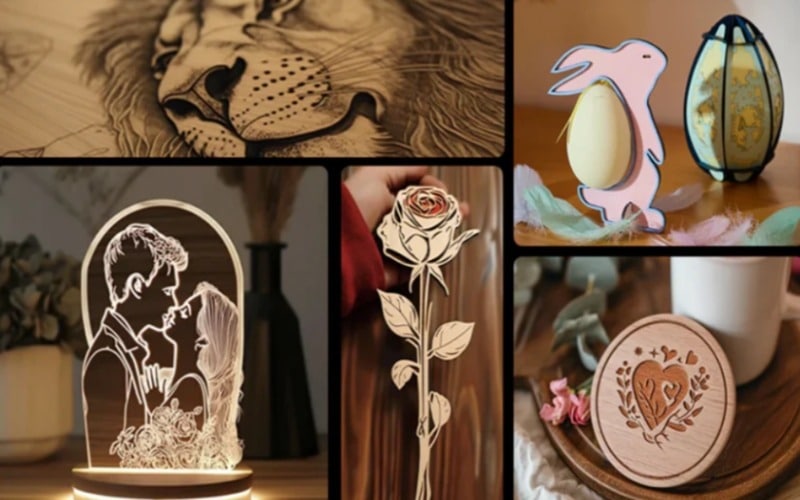
Laser cutting opens up a world of creative possibilities. Here are a few inspiring examples of intricate patterns in action:
- Art and Decor: Laser-cut art pieces or wall hangings are a popular way to showcase intricate designs.
- Jewelry: Intricate patterns, like filigree or lace designs, are perfect for custom jewelry pieces.
- Architecture and Furniture: Laser cutting is used in modern design to create stunning, complex architectural elements or decorative furniture.
Don’t be afraid to experiment with different styles and materials. Whether you’re cutting delicate floral patterns or geometric shapes, there are endless possibilities. And if you’re looking for inspiration, you can find plenty of templates online or use your own imagination to create something unique.
Conclusion
Creating intricate patterns with a laser cutter is a rewarding process that combines design, precision, and creativity. By understanding your equipment, optimizing your designs, and paying attention to the details, you can craft stunning works of art and functional items alike. Now that you know the basics, it’s time to get started and let your imagination run wild!