
Cleaning floors relies on consistent suction power, and a full dust bin can get in the way of that. When a robot vacuum continues working with a packed bin, its ability to pick up debris decreases, leaving more dust behind and making cleaning sessions less efficient. Emptying the bin regularly is one of those small habits that keep the vacuum performing at its best. It also prevents unpleasant odors and allergens from building up inside. In this article, we will explore how often to empty your robot vacuum’s bin and how to maintain it for reliable cleaning results.
Key Factors That Determine Emptying Frequency
Home Size and Floor Space Being Cleaned
The size of your home plays a big role in how often you need to empty your robot vacuum’s bin. A larger space means the vacuum will collect more dust, crumbs, and dirt in each cleaning session, filling the bin much faster. If you live in a small apartment, the bin may only need emptying every few runs, while a multi-room house may require attention after every session. The type of flooring also matters, as hard surfaces tend to collect fine dust while carpets can hold more fluff and debris. Paying attention to how full the bin gets during typical cleanings will help you develop a routine that suits your space.
Pet Hair and Household Debris Levels
Homes with pets usually need more frequent emptying because fur can quickly fill the bin and wrap around internal parts. Even small amounts of pet hair can clump together, taking up space faster than dust or crumbs alone. Busy households with kids or frequent visitors may also generate more debris from daily activities like snacking or crafting. On the other hand, a tidy home with minimal shedding and light foot traffic might go several cleaning cycles before the bin reaches capacity. Observing how your lifestyle affects the vacuum’s workload can guide you toward the right emptying schedule.
Consequences of Infrequent Emptying
Reduced Suction Power and Cleaning Performance
When a robot vacuum’s bin is overly full, airflow inside the machine becomes restricted. This makes it harder for the vacuum to pick up dirt effectively, often leaving behind fine dust or larger crumbs that would normally be captured. You may notice that cleaning runs take longer or that the floor doesn’t look as clean afterward. Over time, reduced suction can cause the vacuum to miss more debris in hidden corners or along walls. Keeping the bin clear helps ensure the vacuum operates at peak strength every time.
Potential Motor Strain and Filter Damage
A packed dust bin can also place extra strain on the vacuum’s motor as it works harder to maintain suction. This added pressure can cause the motor to overheat or wear down faster, shortening the lifespan of the device. Additionally, dust and debris can be forced into the filter area when the bin is full, clogging it and reducing its ability to trap fine particles. In some cases, this buildup can even damage the filter or make it release trapped allergens back into the air. Emptying the bin regularly helps protect these internal components and keeps your vacuum running smoothly.
Smart Features That Help Manage Bin Capacity
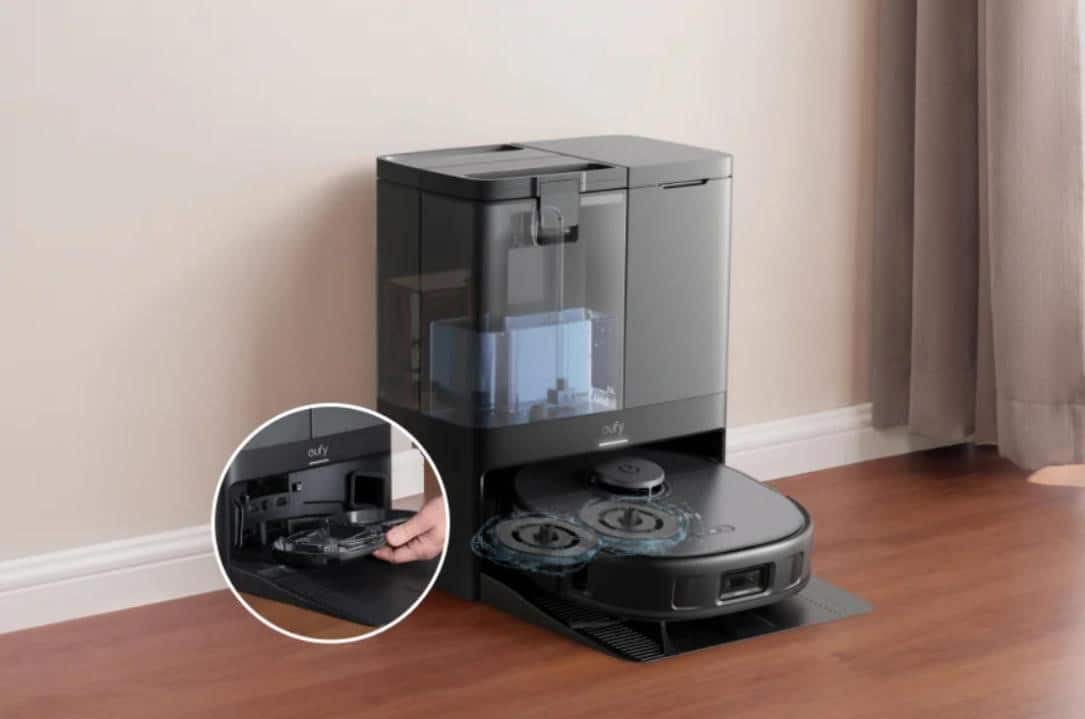
Many modern robot vacuums include helpful features to make bin maintenance easier and less frequent. Some models can automatically detect when the bin is nearing capacity and alert you through an app notification or on-device indicator. Others use advanced navigation to map which areas generate more debris, allowing you to schedule more targeted cleaning and avoid overfilling during a single run. Certain models even include a self-emptying function that transfers collected dirt into a larger bag in their charging station. These features can be especially useful in busy homes, reducing the amount of hands-on maintenance required while keeping cleaning performance consistent.
Best Practices for Maintenance and Hygiene
Proper Disposal Techniques for Allergen Control
When you empty your robot vacuum’s bin, it’s a good idea to do it carefully to avoid spreading dust back into the air. Tapping the contents directly into a trash bag outside or into a sealed container can reduce airborne particles. If you are sensitive to allergens, wearing a mask or using disposable gloves can offer extra protection during the process. After disposal, wiping down the bin’s interior with a dry cloth can remove any lingering dust buildup. These steps help keep your home’s air clean while also maintaining the vacuum’s hygiene.
Cleaning the Bin Between Emptyings
Even if the bin isn’t completely full, occasional cleaning of the bin itself helps maintain performance. Dust can cling to the corners and seams inside the container, slowly reducing its capacity and affecting airflow. Rinsing the bin with water and letting it fully dry prevents any mold or odors from forming. It also keeps sensors and mechanical parts free from dust that might interfere with their function. Regular bin cleaning can make each emptying quicker and keep your vacuum in better condition over time.
Conclusion
Building a routine for emptying your robot vacuum’s bin is one of the simplest ways to keep it performing like new. By paying attention to your home’s size, activity level, and the presence of pets, you can find a schedule that matches your needs and prevents performance drops. If you want to reduce this task even further, consider a self emptying robot vacuum, which can automatically transfer dirt into a larger dust bag inside its base; for example, the eufy X10 Pro Omni automatically clears its bin into a 2.5L bag that only needs replacing about once every two months. Combining these smart features with careful cleaning habits can extend the lifespan of your vacuum and keep your home consistently fresh. With a little regular attention, your robot vacuum can stay efficient and dependable for years to come.